
Your drill sequence wasn't followed, and you're unsure why?
1. First, let's take a look at our sequence. From the screenshot below, we can see that some tasks were skipped.
The option to skip tasks has been selected. What does that mean?
 |
When this option is selected, the agent has the flexibility to move ahead in the sequence if the next block is blocked by a dependency, and can return to mine it later. If you prefer a strict order in the sequence, simply uncheck this option. |
2. To find out why your blocks weren't drilled, simply pick the unsequenced block from the list, right-click with your mouse, and select "Show Dependencies."
3. What do dependencies really mean, and how should we interpret them?
To gain a better understanding of them, it's important to know what Successors and Predecessors are.
- Predecessors are the actions/blocks that need to be completed before the Successors action/block can begin. or
We can take a look at the various statuses of the Predecessor such as Satisfied, Available or Not Satisfied to see if the action can proceed.
From the tree, we can see which actions should begin first in the Predecessor to proceed to the next action, starting from and going up to the last action number
.
In mining, there are several steps that need to take place before we can actually mine the block. Here’s the order of those steps:
- The block needs to be ready for drilling.
- Drilling must be completed before we can move on to charging (this could involve production drilling, GC drilling, or presplit drilling).
- We need to plan the MMU for charging the blocks.
- A blast window should be established to carry out the shot.
- Once the block is blasted, it can then be mined.
<PreBlastSolid> - This means that the pre-blast activity is complete, and the block has been drilled.
ProductionCharging - This is available, which means we need to schedule the MMU to charge this block.
ProductionBlasting - This indicates that we haven't charged the block yet, so we can't move on to another activity.
<PreDigSolids> - Since Production Blasting hasn't started, we can't proceed to the PreDigSolids activity yet.
Once we finish all the previous activities, we'll be ready to move on to Mining.
When it comes to Mining Expand Distance, we can't proceed with Mining: Reserves/M1/P3/P301/910/2/910/1 .
As a Predecessor, we need to mine the block first: Mining: Reserves/M1/P3/P301/910/2/913/1 .
What is Mining Expand Distance?
Dependencies expand on solids found in nearby flitches or benches. The solids at a lower elevation rely on those at a higher elevation. We are establishing this for each activity, including PreDrilling, MiscDrilling, ProductionDrilling, ProductionCharging, PresplitDrilling, and Mining, individually.
The Expand Distance feature functions by taking the polygonal boundary of a solid, expanding it by the specified distance, and then checking for any incomplete activities on the elevation above that fall within that area.
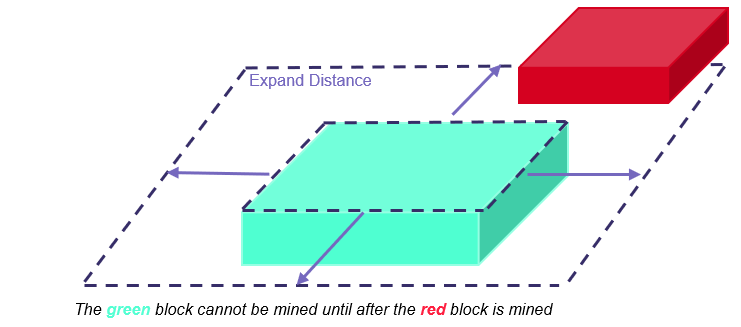
- A positive expand distance requires a minimum space between crests and toes on the running track.
- A zero expand distance permits vertical walls*.
- A negative expand distance allows for under-cutting the bench above by that amount.
*While a zero expand distance technically allows for vertical walls, using values like (-1) or (-5) often leads to better outcomes. This gives the engine a little more flexibility to mine blocks with slight overlaps.
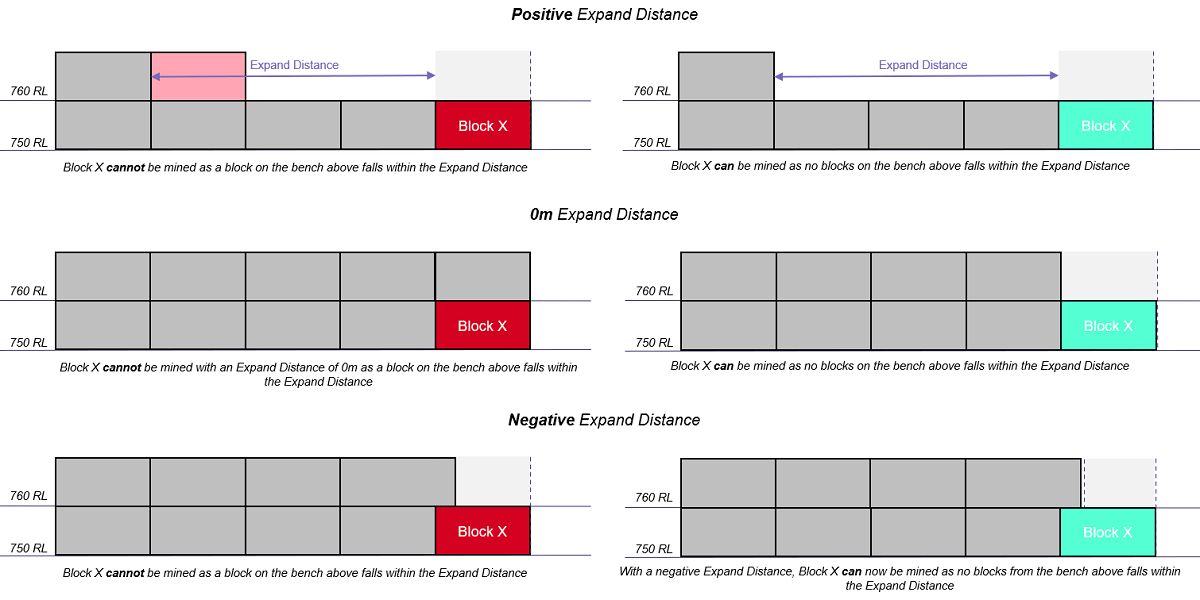
Please fill in multiple values in the Expand Distance column in meters, or simply click the black cross button to clear the related entries.
To summarize the troubleshooting with the drilling sequence (or any sequence), please make sure to schedule all your activities accordingly. If we're unable to drill the block, there could be a few reasons for that. For instance, your excavator might not have mined a block above yet, which means that block isn't available. Keep in mind that the software follows a clear logic similar to your operations. I hope you found the troubleshooting helpful. If you need any support, feel free to reach out; your Alastri team is here to assist you with any questions you may have.
Comments
0 comments
Please sign in to leave a comment.