
This guide has been produced to understand why the scheduling error, conflicting constraints, arise and methods to fix the problem.
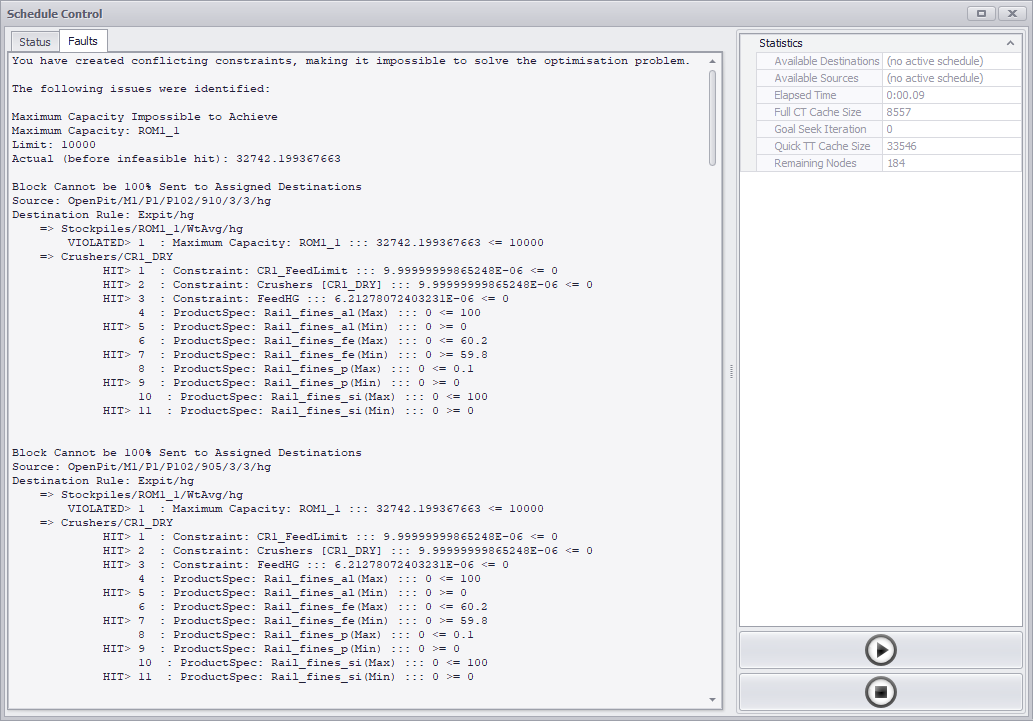
Figure 1 - Scheduling Error - Conflicting Constraints
The above optimization problem cannot be solved due to conflicting constraints. In Optimize Products mode as the scheduling engine operates in two passes:
- Selecting a block sequence based on target tonnes/rates
- Running an optimization to allocate each block to a destination.
If constraints, capacities, or product limits prevent material from being assigned to a destination, an optimization failure occurs. Use the following keywords to see which optimization parameter could not be met:
- VIOLATED indicates a capacity limit was exceeded.
- HIT means a product specification reached its limit.
Another method is providing an extra location for material to move when a certain constraint has been violated or hit. An overflow destination can be created to help investigate deeper the error message.
Want to learn more?
Online Help Manuals - Click here for the latest version
Learning Management System - Click here to login or here to request access
Comments
0 comments
Please sign in to leave a comment.