
In the step Haulage Configurations, users will set the default haulage configurations for the model including default truck/loader type, haulage materials, haulage quantity type, and fill sequencing type.
With that in mind, you may encounter the following error message, which must be resolved in order to proceed further through the project setup and move on to the scheduling:
"Truck Type not Found"
Error message: "The following trucks are missing from Haul Infinity (<....>)."
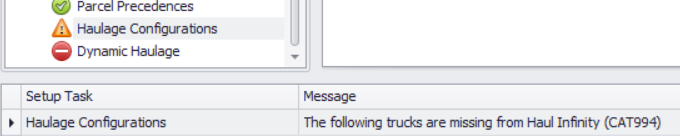
Truck Type not Found Error Message
Truck types are not matching in ATS Setup --> Truck Types and Haul Infinity Setup --> Trucks. Check for mismatches between ATS and HI.
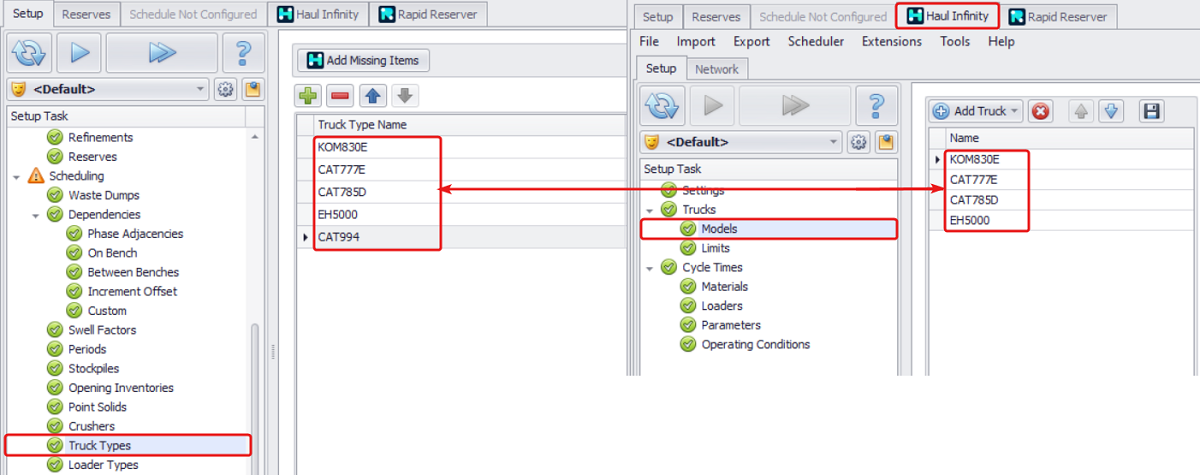
Comparison between ATS and HI for Truck Types
Loader Type not Found
Error message: "The Loader Type <...> was not found in the loaded Haul Infinity project."

Loader Type not Found Error Message
Loader types are not matching in ATS --> Setup --> Loader Types and Haul Infinity --> Setup --> Loaders. Extra symbols or spaces can also cause this error. Check mismatches between ATS and HI.
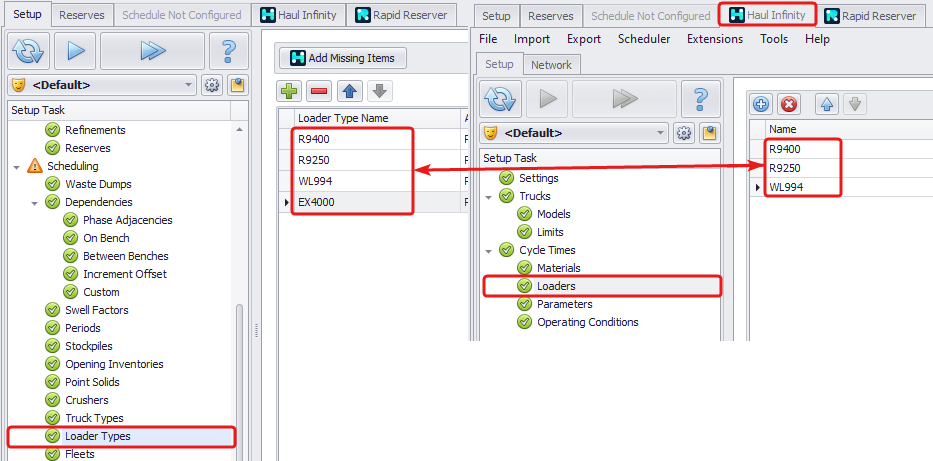
Comparison between ATS and HI for Loader Types
Want to learn more?
Online Help Manuals - Click here for the latest version
Learning Management System - Click here to login or here to request access
Comments
0 comments
Please sign in to leave a comment.